Arrow Games

















4 Arrow Puzzle Games Compared: Which One Should You Play?
Compare Arrow Eliminate, Tap Away Arrow, Arrow Out Online, and Arrows Go by gameplay, difficulty, pace, power-ups, and strategy.
4 Arrow Puzzle Games Compared: Which One Should You Play?
In a screenshot, Arrow Eliminate, Tap Away Arrow, Arrow Out Online, and Arrows Go can look like the same idea: directional pieces, tap controls, a board to sort out. In play they split quickly.
One is a rotatable 3D stack. One spends a Move on every action. One is flat removal order. One is a maze you escape rather than a board you empty. This piece lines those differences up so you can pick by how you like to solve, not by similar names.
Quick pick
- 3D spatial boards: Arrow Eliminate
- Move optimization: Tap Away Arrow
- Calm sequence clearing: Arrow Out Online
- Maze / route finding: Arrows Go
New to the style? Start with Arrow Out Online — remove an arrow only when its lane is open. If that feels too gentle, try Tap Away Arrow for a tighter Moves counter or Arrow Eliminate for a rotatable stack. Pick Arrows Go when you would rather trace one route than dismantle a pile.
Side-by-side
| Game | What the arrow does | Core loop | Pressure | Strongest quality | Main limitation |
|---|---|---|---|---|---|
| Arrow Eliminate | Sets each cube's exit direction | Rotate, inspect, clear the stack | Limited taps or a countdown | Spatial depth, two modes | Crowded stacks need frequent camera checks |
| Tap Away Arrow | Sets where each colored block moves | Reposition and clear every block | Every action spends one Move | Efficiency matters | Legal but useless moves waste the budget |
| Arrow Out Online | Defines the only lane a piece can use | Remove blockers in order | Wrong sequence slows the clear | Clean, readable logic | Less variety than the other clearers |
| Arrows Go | Forms the route through the maze | Trace a path and escape | Wrong choices cost hearts | Maze objective, not clearing | Dense boards can tire the eye |
The first three end with an empty board. Arrows Go ends when you leave the maze. That alone is enough to change who each game suits.
Arrow Eliminate
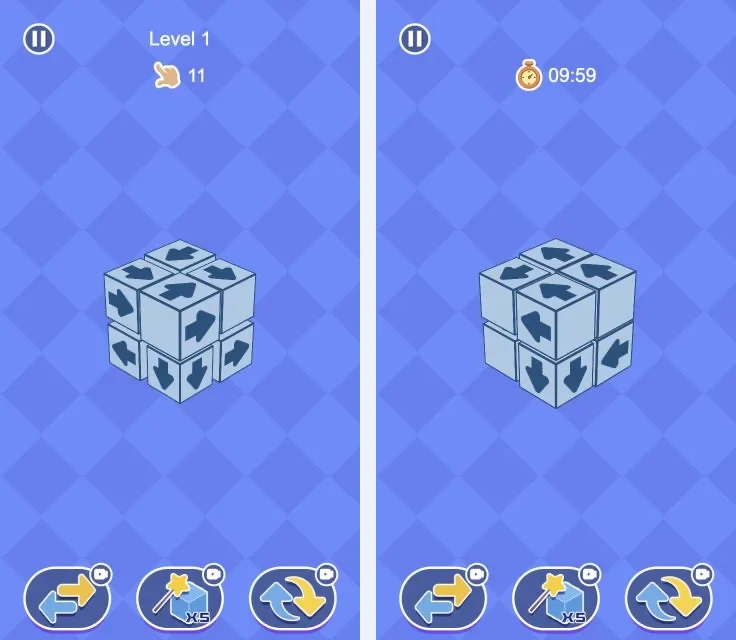
Left: Level Challenge — level number and remaining operations. Right: Quick Challenge — countdown timer.
Arrows sit on the faces of a 3D cube stack. A cube leaves only when its face points into open space. Pieces hide behind and beside each other, so you rotate the board before you know what is free.
A flat arrow game often shows its available moves in one scan. Here the front view is incomplete. Something that looks trapped may exit cleanly from the back; something that looks open may still have a cube on its path.
Two modes share the same rule:
- Level Challenge — limited taps. A blocked or careless tap still costs one.
- Quick Challenge — a countdown instead of a tap budget.
Shuffle and cube-removal can bail out a messy stack; restart helps when an early mistake has already burned the budget. The friction is the same as the appeal: on a crowded stack, sorting depth, direction, and blockers takes time. If you want an immediate flat board, Arrow Out Online will feel faster.
Tips: rotate once before the first move; check the far side of a cube before calling it blocked; in Level Challenge, do not “test” a doubtful cube; clear obvious outer cubes, then rotate again; in Quick Challenge, scan in broad sweeps instead of spinning after every tap.
Best if: you like reading a 3D object, not only a flat sequence. Play Arrow Eliminate
Tap Away Arrow
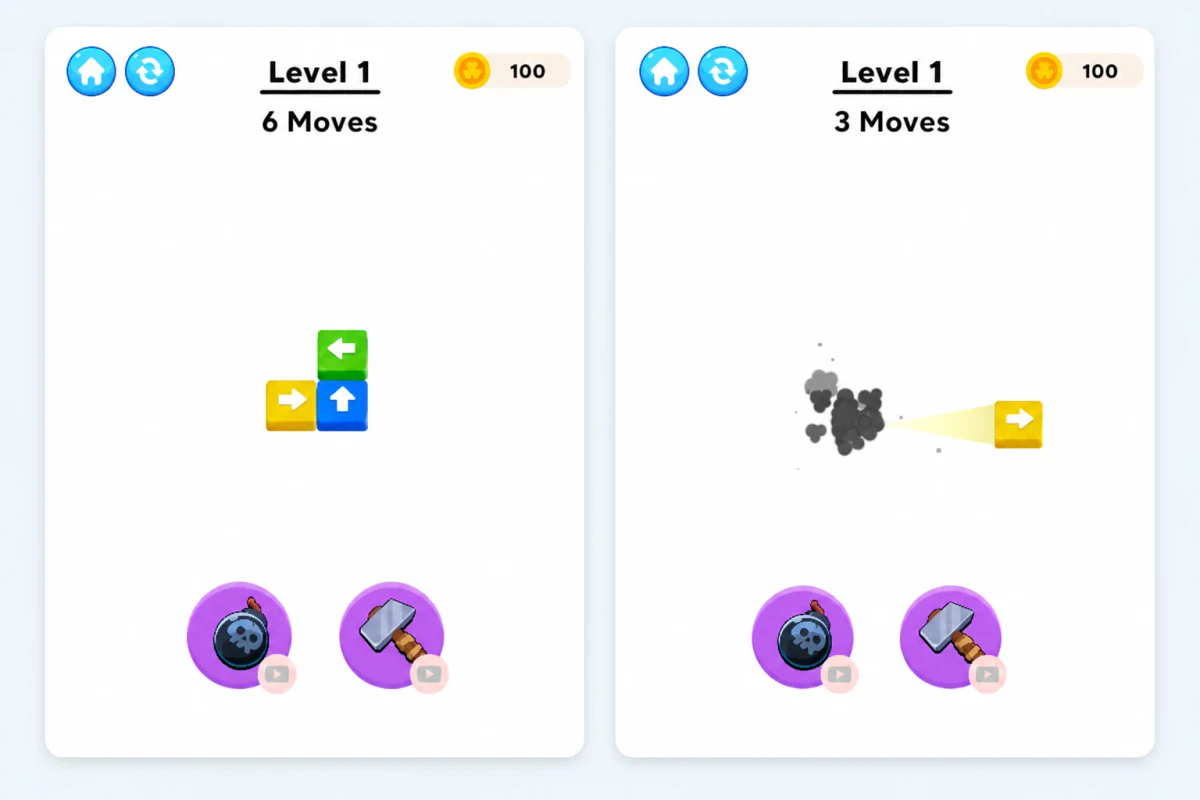
Three actions drop the counter from 6 Moves to 3 Moves.
It looks like a colorful block clearer, with one hard rule: every movement uses one Move. Remove, reposition, or connect — the counter still falls. Finishing is about efficiency, not eventually finding any legal sequence.
Before each tap it helps to ask whether the move clears a block, opens a lane, or only rearranges the same mess. The last case is what usually forces a restart. Bomb clears a crowded patch; hammer removes one problem block. The real decision is when a tool saves more Moves than ordinary play.
The downside is the same system. A move can be legal and still worthless. A few taps spent sliding a cluster around can leave too few Moves to finish — less forgiving than Arrow Out Online when the route is not obvious.
Tips: estimate removal moves before spending budget on setup; prefer actions that both open space and advance a block; do not connect and split the same group unless that frees something else; hammer for a single keystone block, bomb for a jammed region; restart early when the remaining board needs more actions than the counter allows.
Best if: you like tightening a solution until every tap earns its cost. Play Tap Away Arrow
Arrow Out Online

A full board and a partly cleared board — each removal exposes the next dependencies.
Tap an arrow and it travels the way it points. Clear lane: it leaves. Blocked lane: it stays. Clear the board by removing pieces in the right order.
There is no Moves budget and no 3D rotation. The whole game sits on dependency: which arrow is free now, what blocks it, and what opens after the next removal. Zoom, hint, and grid reveal help on tight layouts without changing that core task.
If you want multiple modes, move budgets, or heavy power-up play, this one stays lighter. Variety mostly comes from board layouts, so it hinges on whether you enjoy reading blockers and order.
Tips: start with edge arrows pointing out; trace the full path — a blocker a few spaces away still counts; look for chains (A frees B, B frees C); after a central blocker goes, re-scan the whole board; use a hint when you see no legal arrow, not only when the best order is unclear.
Best if: you want a quiet session and a clear first step into arrow clearing. Play Arrow Out Online
Arrows Go
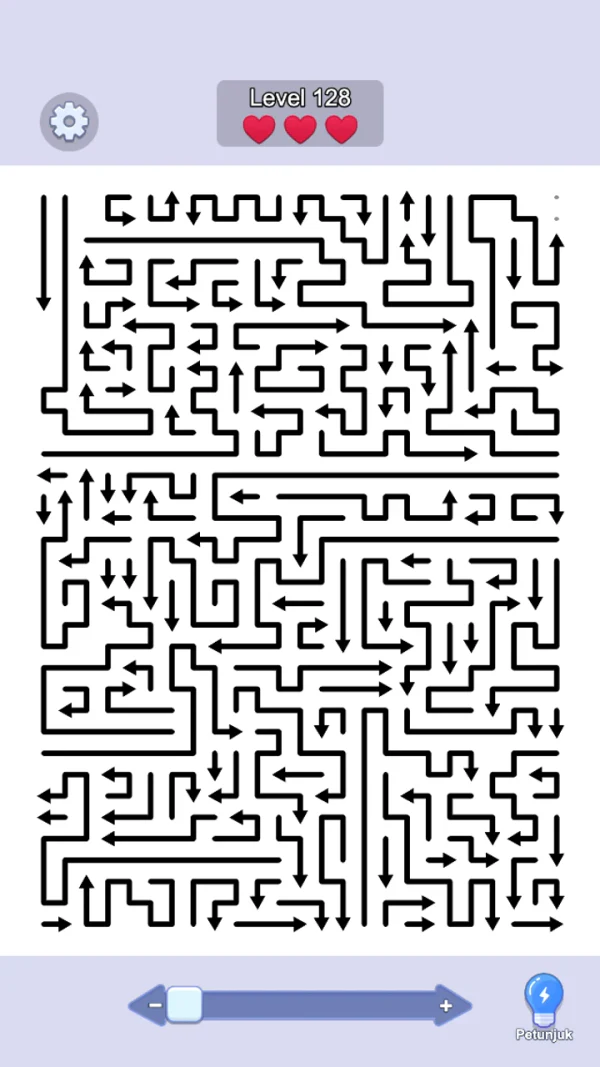
A dense directional maze with a three-heart limit, zoom, and hint.
Same directional theme, different job. You are not firing every piece off the board. You read the arrows as a connected maze and find a route to the exit.
Dense boards are full of locally plausible directions; only one continuous route works. Hearts limit mistakes; zoom and hint help when the grid is hard to parse. Arrow Out Online can be played one free piece at a time; Arrows Go rewards holding several turns in mind before you commit.
Busy layouts can tire the eye, and an early wrong turn can waste the rest of the path. If you prefer watching a board shrink piece by piece, the maze objective may feel less concrete.
Tips: zoom out for structure, then in for individual turns; plan several steps before committing; if the start is muddy, work backward from the exit; treat intersections as checkpoints; use a hint before a pure guess when hearts are low.
Best if: you like mazes and finding one thread through a busy field of directions. Play Arrows Go
Where they really differ
Board shape. Only Arrow Eliminate asks you to rotate a 3D stack and reason about hidden faces. The other three stay flat, though Arrows Go can still feel crowded.
Win condition. Eliminate, Tap Away, and Arrow Out empty the board. Arrows Go escapes a route. That is the main fork when choosing.
Cost of a mistake.
- Arrow Eliminate — spent taps (Level) or lost time (Quick)
- Tap Away Arrow — fewer Moves left
- Arrow Out Online — a dead-end sequence you have to rethink, without the same resource meter
- Arrows Go — lost hearts and a broken route
What a good run leans on. Spatial reading (Eliminate), action economy (Tap Away), dependency order (Arrow Out), route tracking (Arrows Go).
Which to open first
- Arrow Out Online — flat board, cause and effect easy to see
- Tap Away Arrow — when you want each decision to cost something
- Arrow Eliminate — when flat boards feel too thin and you want rotation plus a tap limit or timer
- Arrows Go — when clearing pieces is not the part you enjoy
None of them replaces the others. Relaxed clearing, tight efficiency, 3D pressure, and maze reading are different habits. All four run in the browser on Arrow Games, so a short round of each is the fastest way to see which loop sticks.
Arrow Game Reviews